Concept - Organization
What is an Organization in EIQ Platform?
When you subscribe for the platform, a dedicated platform instance is created for you. A platform instance is referred as an organization. The instance name that you provide during the subscription is your organization name here after referred as organization.
This organization is a self-contained workspace, where you manage users and build applications. An organization comprises all the entities required to operate a business unit within the platform. Multiple organizations can be created for a business unit with multiple licenses.
To start using the EIQ Platform, you must subscribe to at least one organization (platform instance).
Initial Setup
After the subscription process, when you access the platform for the first-time, the initial workspace setup automation process navigates you through a sequence mandatory of configuration steps that are required to get started with the platform. The mandatory configurations that are handled through one-time setup wizard are:
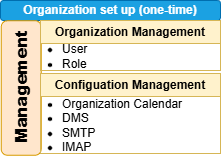
You can change or update configurations by navigating to the corresponding sections.
Key Characteristics
Each organization functions as an independent environment with its own:
- License, organization configuration, and time zones.
- Users and roles.
- Multiple applications and workflows.
- Independent Configurations, Portal settings, Custom integrations.
- Databases and process definitions.
- Branding elements.
Understanding Organization Hierarchy
This diagram provides you an overview of organization hierarchy.
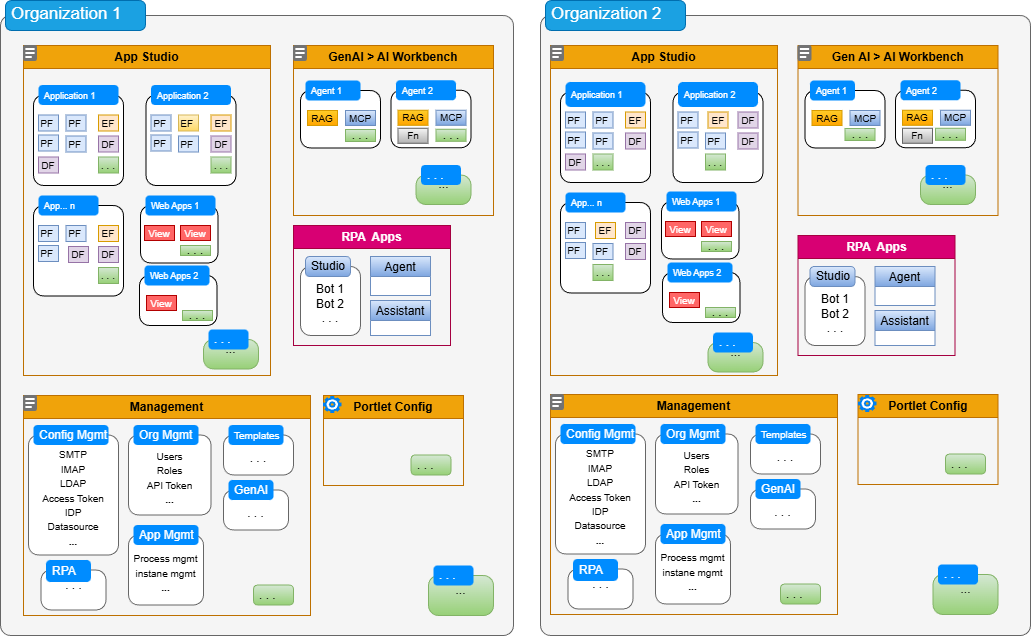
PF: Process flow; EF: Event flow; DF: Data flow
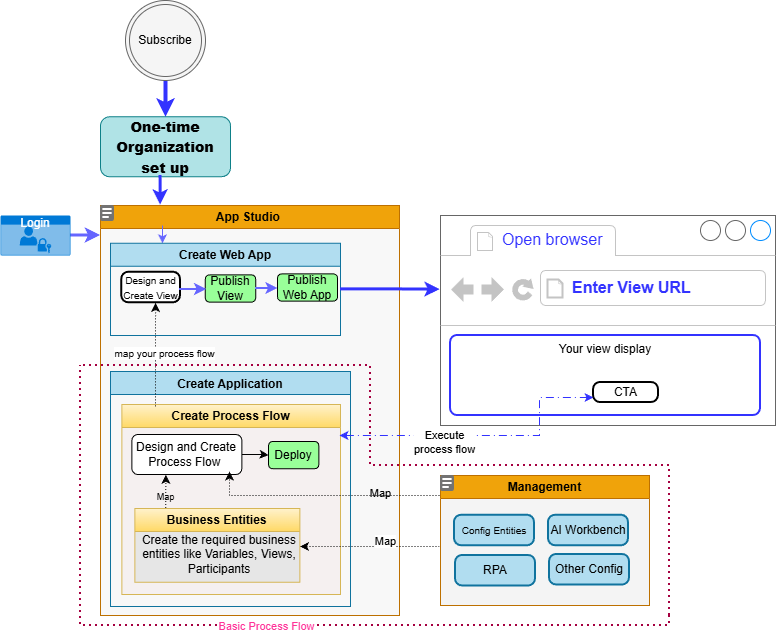
Basic Process Flow Creation Steps - Diagram
This simple flow diagram gives you a high-level understanding of where to start with in the platform for creating a basic process flow.
Multiple Organizations
Multiple organizations can be used to represent different business units such as departments, branches, or subsidiaries. When business units require different workflows, configurations, or data isolation, multiple organizations can be created.
Why Multiple Organizations?
Multiple organizations allow you to:
- Clearly separate different business units.
- Avoid data overlap or conflicts.
- Configure each unit independently.
- Provides Data Isolation and Access Control.
- Data is not shared unintentionally across organizations.
- Access is restricted to authorized users only.
- Each organization is accessible through a dedicated instance URL, allowing users to work within a specific environment.
When to Use a Single Organization?
Use a single organization when:
- All users belong to the same operational structure.
- Business processes are uniform.
- Data can be managed centrally without conflicts.
When to Use Multiple Organizations?
Use multiple organizations when:
- Business units operate independently.
- Workflows and processes differ significantly.
- Data must be strictly isolated.
- Teams require separate administrative control.