RPA Audit
About Audit Logs
The Audit Logs section in the RPA Management provides a comprehensive record of all critical actions performed within the RPA Management module. It ensures transparency and traceability for configuration and access-related changes made by users.
Audit logging is enabled for the following categories:
- PROJECT: Logs related to project, activities creation and management.
- CREDENTIAL – Logs related to creation, update, and deletion of credentials.
- MACHINE BASED ALLOCATION – Logs related to the allocation of workflows to machines.
- USER BASED ALLOCATION – Logs related to the allocation of workflows to individual users.
This section enables you to:
- Monitor all changes made to sensitive configurations.
- Track who and when the action is performed.
- View the outcome of each operation (success or failure).
Viewing RPA Audit Details
-
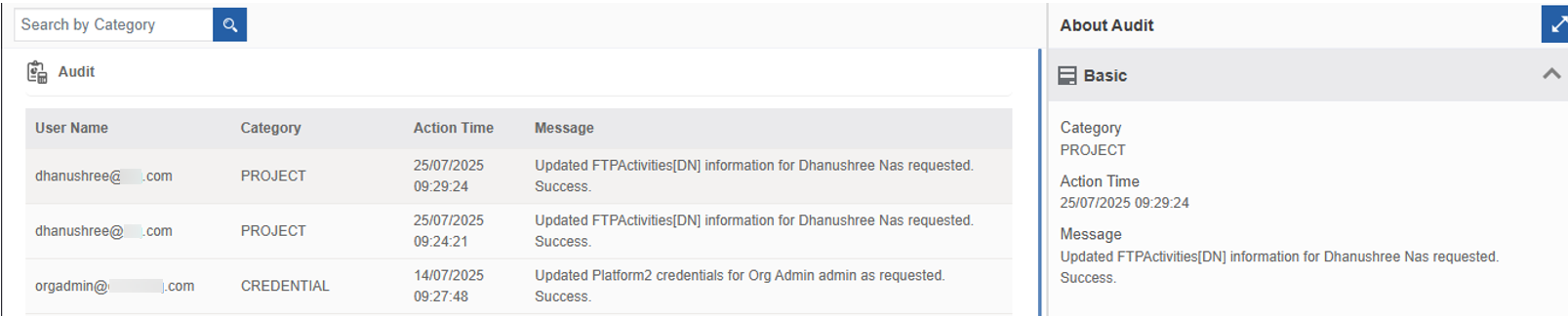
Go to Main Menu > Management > RPA Management > RPA Audit. Audit list appears for the user.
-
User Name: The email ID of the user who performed the action.
- Category: The type of activity: PROJECT, CREDENTIAL, MACHINE BASED ALLOCATION, USER BASED ALLOCATION.
- Action Time: The timestamp when the action was executed.
- Message: A detailed log of what was done (E.g., “Workflow_X has been allocated…”).
Searching Audit By Category
The search feature makes it easier to fetch specific category-based audit details.
- Go to Main Menu > Management > RPA Management > RPA Audit.
-
Click the “Search by Category” textbox at the top-left and enter the category name. As you type the name, the filtered result dynamically appears on the grid.
Category names: project, credential, machine based allocation, user based allocation.