Data Flow Error Handling
Error handling allows you to define a centralized workflow to manage failures in a data flow. You can configure the error handling mechanism in the data flow level and then apply it to each activity in the data flow
This flow is triggered when there is an exception or error during the execution of the dataflow.
Executing workflow in activity level
If you want to execute this workflow in the activity level, you must select the “Trigger Error workflow” in the activity configuration.
Configuring Data Flow Error Handling
- Go to Main Menu > App Studio > Applications > open [Application_Name] > Data Flow > Create New/Edit Data Flow.
- Create and design your data flow using required activities and click on the canvas. The data flow details appear on the property panel.
-
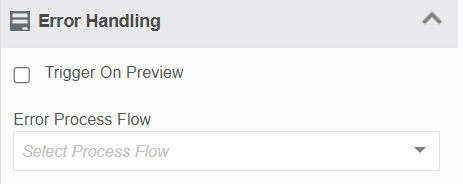
Click Error Handling.
-
Trigger On Preview
- Select the checkbox to trigger the error work flow during the preview.
- If unchecked, the error workflow will trigger only at the runtime.
-
In the Error Process Flow list, select the error flow handling process flow. The mapping details appear.
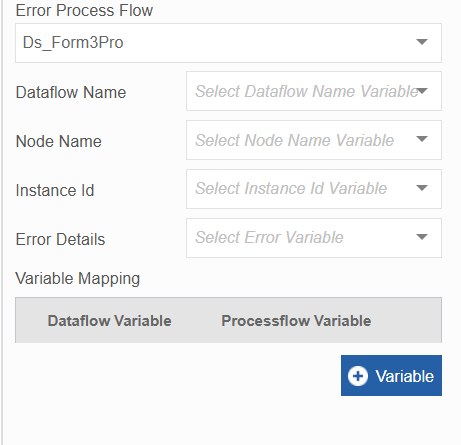
Your data flow passes its details to the process flow.
Field Description Dataflow name This is the name of your dataflow. Select the form component name that should hold this value. Node Name This is the name of your node or activity that caused the error. Note that this will be first activity that caused the error. Instance Id This is the name of your dataflow instance. Error Details This is the exact detail of error in your activity. -
In the Variable mapping section click +Variable. The details appear.
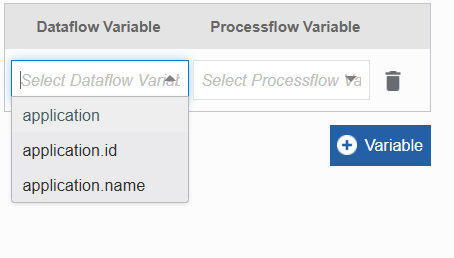
- In the Dataflow Variable drop-down, select a data flow variable name.
- In the Processflow Variable, select the process flow variable or form component name.
-
Click +Variable again to add more variable mappings.
Trigger the mapped workflow in the activity
You must trigger this error workflow in the activity > Error handling section.
Example Use Case
A data flow processes customer records from a CSV file. If processing fails, an email notification is sent to the administrator using an error process flow.