Expression Builder
Expression Builder applies to the activities, Aggregate and Transformer.
The expression builder allows you to build rules applying functions and conditionals on the attributes as per your requirements.
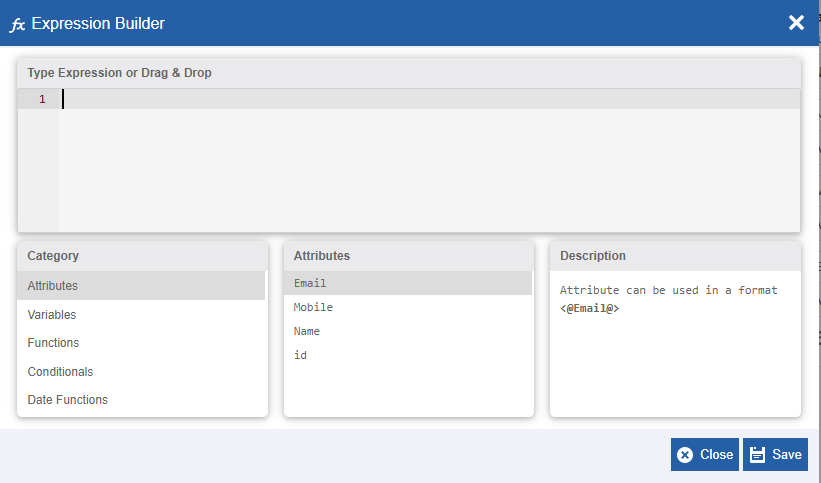
The Expression Builder
Working with Expression Builder
You can write your query in the expression builder directly or you can write the query using the details available in the builder.
-
In the expression builder, enter the query, or in the “Type Expression or Drag & Drop” area drag and drop the query content
Or use the built-in features to create the queries. -
Click Category and select the category required. The Attributes column displays the items available within that category.
-
Click an Attribute item and the Description section displays the explanation of the selected item.
The components in the expression builder that are used to build queries are explained in the subsections below.
Attributes
The Attribute category displays the list of attributes of the Data Model that is mapped.
Format: \<@AttributeName@>
Attributes are used in the format \<@AttributeName@> in the Expression builder for creating the expressions.
Variables
The Variable category displays the list of variables in the data flow which are combinations of user-defined and system variables in the data flow.
Format: \<\$VariableName\$>
Variables are used in a format \<\$VariableName\$> in the Expression builder for creating the expressions.
Functions
The Functions category displays the list of functions that can be used within the expression builder to achieve desired results. Functions need to be used along with variables and/or datamodel attributes.
The Functions listed in the Expression builder are explained below.
| Function | Description | Syntax/Example |
|---|---|---|
| average | Returns the average (mean) value of the rows as the result. | Syntax : AVG(Input) Example : AVG(<@AmountCol@>) |
| concat | Combines strings and returns the concatenated value. | Syntax : CONCAT(Input1,Input2) Example : CONCAT(<@name@>, <$var_name$>) |
| count | Returns the count of number of records for the selected input attribute of datamodel. | Syntax: COUNT (Input) Example : COUNT(<@name@>) |
| floor | Returns the largest integer value that is less than or equal to the argument. | Syntax : FLOOR(Input) Example : FLOOR(-0.1) |
| instr | Returns the location of a search string occurrence in a string input. | Syntax : INSTR(String,SearchString) Example : INSTR('DemoSQL', 'SQL') Result : 5 |
| length | Returns the number of characters in the string. | Syntax : LENGTH(Input) Example : LENGTH(<@name@>) |
| lower | Returns the string with all characters changed to lowercase. | Syntax : LOWER (Input) Example : LOWER(<@name@>) |
| ltrim | Removes all leading spaces from a string | Syntax : LTRIM(Input , characterToTrimString) Example : LTRIM(<@name@>, ‘_’) |
| maximum | Returns the highest numerical or decimal value for the input attribute of a datamodel. | Syntax : MAX(Input) Example : MAX(<@name@>) |
| minimum | Returns the lowest value. If no rows are selected, the result is NULL. Applicable only to select statement. |
Syntax : MIN(Input) Example : MIN(<@name@>) |
| mod | Mod stands for the Modulus expression. The Modulus is the remainder of the euclidean division of one number by another. | Syntax : MOD (dividendNumeric , divisorNumeric) Example : MOD(2, 1.8) Result : 0.2 |
| regexp_replace | Replaces each substring that matches a regular expression. | Syntax : REGEXP_REPLACE(InputString, RegexString, ReplacementString) Example : REGEXP_REPLACE(<@Attr@>, ’+’ , ’ ‘) |
| replace | Replaces all occurrences of a search string in a text with another string. | Syntax: REPLACE(str, search, replace) Example: REPLACE(<@Attr@>, “fly”, ”paper”) |
| round | Rounds to a number of fractional digits. | Syntax: ROUND(input, frac)) Example: ROUND(2.5, 0); 3.0 |
| rtrim | Removes the right trailing spaces from the string. | Syntax: RTRIM(trimStr, str) Example : RTRIM(<@name@>, ‘ ‘) |
| substring | Returns the substring of string (str) that starts at position (pos) of specific length (len). | Syntax: SUBSTRING(str, pos, len]) Example : SUBSTRING(<@name@>, 2, 4) |
| sum | Returns the sum of values in a attribute of datamodel in numerical or decimal format based on input. | Syntax: SUM(<@name@>) |
| trim | Removes all trailing spaces from a string. | Syntax : TRIM(BOTH trimStr FROM INPUT) Example : TRIM(BOTH ‘_‘ FROM <@Attr@>) |
| upper | Converts a string to uppercase. | Syntax: UPPER(<@name@>) |
Conditionals
The Conditionals category contains the list of conditionals that can be used within the expression builder to achieve desired results.
The Conditionals supported in the Expression builder are explained below.
| Conditionals | Description | Syntax/Example |
|---|---|---|
| CASE | CASE can be used for conditional statement. Output is based on the conditions provided in the “When” syntax. | CASE WHEN <@name@> = 'Steve' THEN <@name@> WHEN <@name@> = 'Mark' THEN 'Mark' END |
| ELSE | ELSE is used for providing a default action. | WHEN <@name@> = 'Mark' THEN 'Mark' ELSE <@name@> |
| END | END is used as terminate/finish the Case/When statement. | END |
| THEN | THEN is used for providing action on certain condition. | WHEN <@name@> = 'Steve' THEN CONCAT(<@name@>,'_Success') |
| WHEN | WHEN is used for providing a condition. | WHEN <@name@> = 'Steve' THEN |
Date Functions
The Date Functions category contains the list of date functions that can be used within the expression builder to achieve desired results.
The Date Functions supported in the Expression builder are explained below.
| Date Functions | Description | Syntax/Example |
|---|---|---|
| current_date | Returns the current date. | CURRENT_DATE() |
| current_timestamp | Returns the current timestamp with the time zone. | CURRENT_TIMESTAMP() |
| datediff | Returns the number of days difference between the two dates provided. | DATEDIFF(CURRENT_DATE(), \<@date_attribute@>) |
| hour | Returns the hour component of the string/timestamp. | HOUR('2009-07-30 12:58:59') = 12 |
| month | Returns the month component of the date/timestamp. | MONTH('2016-07-30') = 7 |
| quarter | Returns the quarter of the year for date, in the range 1 to 4. | QUARTER('2016-08-31') = 3 |
| second | Returns the second component of the string/timestamp. | SECOND('2009-07-30 12:58:59') = 59 |
| year | Returns the year component of the date/timestamp. | YEAR('2009-07-30 12:58:59') = 2009 |