Resource Data
Resource data displays the list of available Variables (Simple Variables and Entity Variables) and Participants.
The content cagtegory and list of items inside the resource data panel is dynamic based on where you access the Resource Data panel.
You can view the Resource Data panel when you expand the Info Actions panel or the properties panel where you configure the details.
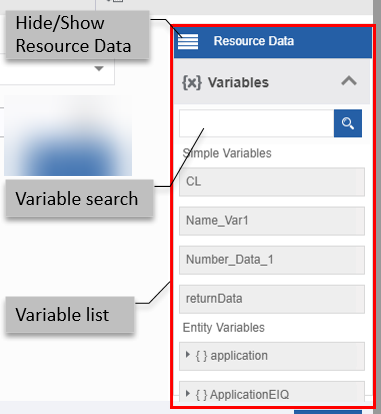
You can utilize the resource data variables within your configuration fields as applicable. If applicable to a configuration field, it allows you to drag and place the variable in the field.
Usage:
- Click the burger symbol in the Resource Data to hide/show the resource data list.
- Drag a variable from Resource Data to the text box or any other variable holders as required.
- Click Entity Variables to list all the variables within the flow.
- Click Participants to view the variables associated with participants, users, and roles.
- Click Close to close the expanded/pop-up view of the Info Actions.
Variables Search:
- Enter the name or first few letters of the variable. The filtered result appears.
Variable Types:
- Simple Variables – Displays created variables that have standard data types.
- Entity Variables – Displays system-generated entity variables and data entity variables
Participants:
- Participants lists all the participants, users, and roles in the flow.