Platform Audit Details
Introduction to Audit Details in the Platform
Audit tables are added to the database to monitor particular platform-based actions and triggers. The platform audit details are captured internally in the database named “platform_audit”. Audit details can be retrieved utilizing the DB scripts entity. Multiple tables in the platform_audit database capture specified details from the platform. Audits in the platform are at the database level.
The actions that are performed in the platform that are necessary to be tracked for a purpose are included in the audit tables. The actions such as the creation of applications, processes, etc. are included in the audit.
Audit Tables in the “platform_audit” Database
The actions and runtime executions that are happening at the different levels (application level, process flow level, entity level, etc.) are recorded in the internal DB tables.
Each instance of the process flow execution is separately recorded based on the action and execution.
Actions applied to a particular artifact by different users are also audited.
The “platform_audit” database has tables for capturing the audit details for the actions and operations done in the platform.
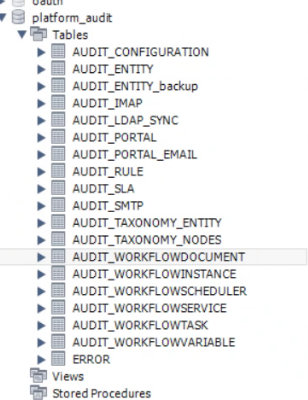
Figure 1: Audit Tables
AUDIT_CONFIGURATION
The AUDIT_CONFIGURATION table records the actions that are happening at the configuration entity level in the design time.
Applicable sections: Management > Configuration Management section has all the configuration entities.
When you create, update, or delete a configuration entity, those operations are captured along with the user who performed the operation and the date and time of the action.
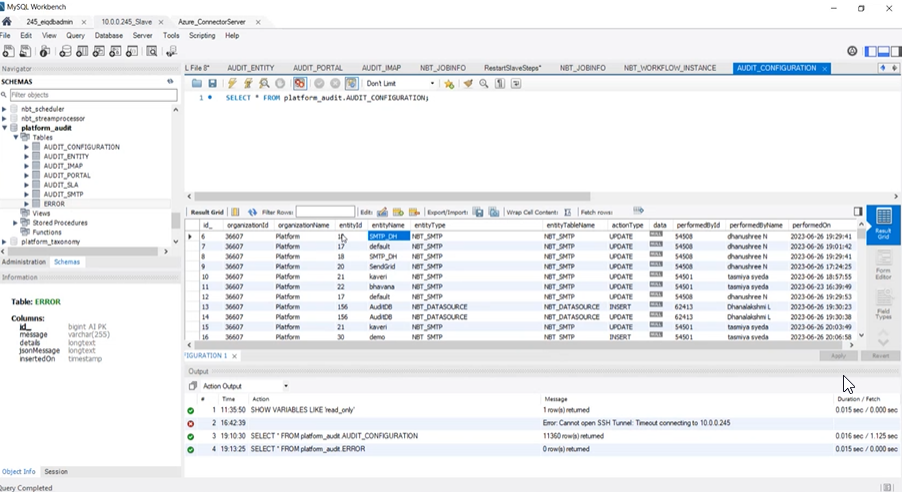
Figure 2: AUDIT CONFIGURATION table
AUDIT_CONFIGURATION Table Details:
-
Organisation Id: Id of the Organization in which the action is done.
-
OrganizationName: Organization in which the action is done.
-
EntityId: Entity Id of the configuration entity. This is an internal reference number of the configuration entity.
-
EntityName: Name of the entity.
-
EntityType: For which configuration entity, the action is performed.
-
EntityTablename: The entity table name to which the entity details are updated.
-
ActionType: Type of action that is performed. INSERT, UPDATE, and DELETE are the action types.
-
PerformedById: Id of the user who performed the action.
-
PerformedByName: Name of the user who performed the action.
-
PerformedOn: Date and time on which the action or operation is done.
AUDIT_ENTITY
The AUDIT_ENTITY table records the actions that are happening in the application, process flow and business entity level during the design and deployment.
Applicable sections: App Studio section has applications, process flows, and business entities.
When you create, update, or delete an application or a process flow or a business entity, those operations are captured along with the user who performed the operation and the date and time of the action.
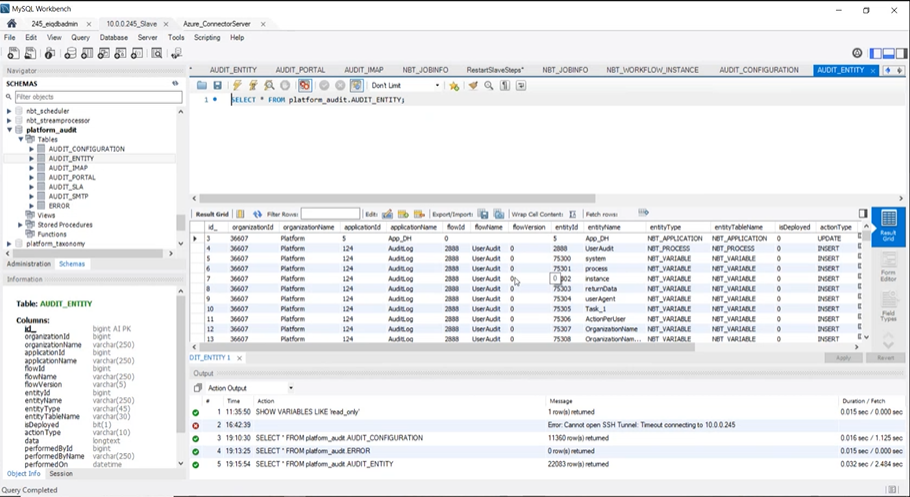
Figure 3: AUDIT ENTITY table
AUDIT_ENTITY Table Details:
-
OrganisationId: Id of the Organization in which the action is done.
-
OrganizationName: Organization in which the action is done.
-
ApplicationId: Id of the application.
-
ApplicationName: Name of the application.
-
FlowId: Id of the process flow.
-
FlowName: Name of the process flow.
-
FlowVersion: Version of the process flow.
-
EntityId: Entity Id of the configuration entity. This is an internal reference number of the entity.
-
EntityName: Name of the entity.
-
EntityType: For which entity, the action is performed.
-
EntityTablename: The entity table name to which the entity details are updated.
-
IsDeployed: Is deployed status.
For Creation, the status is INSERT with the Flag, Is Deployed = 0.
Deloyment of a process flows is also captured as an operation with status as INSERT (The Flag, Is Deployed = 1). When a deployment happens, the process flows and all the business entities in that flow get deployed and hence deployement of all the business entities in the flow is captured with status as INSERT with flag Is Deployed = 1.
-
ActionType: Type of action that is performed. INSERT, UPDATE, and DELETE are the action types.
-
Data: JSON structure of the data (for the applicable entities like Rule entity).
-
PerformedBy Id: Id of the user who performed the action.
-
PerformedByName: Name of the user who performed the action.
-
PerformedOn: Date and time on which the action or operation is done.
AUDIT_IMAP
AUDIT IMAP table captures details at the execution level.
The AUDIT IMAP table records details of the emails that are been read.
Applicable sections: Management > Configuration Management > IMAP
During the process flow execution, when an email is read by the IMAP – that is, when an email subject is matched with the criteria that is configured the email is read - the email details are captured.
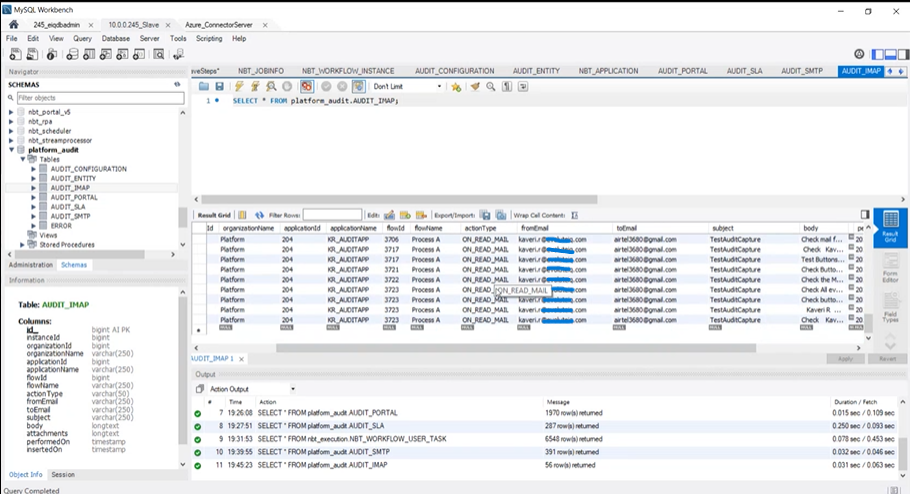
Figure 4: AUDIT IMAP table
AUDIT_IMAP Table Details:
-
InstanceId: Id of the Organisation in which the action is done.
-
ApplicationId: Id of the associated application.
-
ApplicationName: Name of the associated application.
-
FlowId: Id of the associated process flow.
-
FlowName: Name of the associated process flow.
-
ActionType: Type of action that is performed. ON_READ_TYPE is the action type.
-
FromEmail: From adderess of the email. That is from which email id the email is sent.
-
ToEmail: To address in the email.
-
Subject: Subject line of the email.
-
Body: Body of the email in normal text format.
AUDIT_LDAP_SYNC
The sync user feature in the LDAP configuration allows you to sync users to the AD. When the LDAP sync happens, background operations are performed to sync the details. The AUDIT_LDAP_SYNC table captures the sync details when an LDAP synchronization operation is performed.
Applicable sections: Management > Configuration Management > LDAP section.
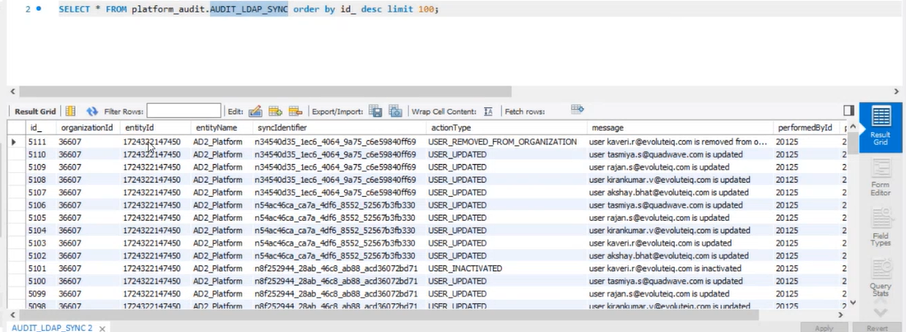
Figure 5: AUDIT LDAP SYNC table
AUDIT_LDAP_SYNC Table Details:
-
Organization Id: Id of the Organization in which the action is done.
-
EntityId: This is the LDAP server Id on which the LDAP sync occurred. This is an internal reference number.
-
EntityName: LDAP configuration entity name.
-
SyncIdentifier: The backend identifier for the sync action occurred.
-
ActionType: Type of action that is performed. USER_CREATED, USER_UPDATED, USER_INACTIVATED, USER_DISABLED, and USER_REMOVED_FROM ORGANISATION are the action types.
-
Message: Information on what action is performed for which user.
-
PerformedById: Id of the user who performed the action.
-
PerformedOn: Date and time on which the action or operation is done.
AUDIT_PORTAL
The AUDIT_PORTAL table records the actions that are happening at the User level, Role level, and Platform Page level.
Applicable sections: Management > Organization Management section Users and Roles section.
Page details are at the organization level and you can navigate to Administration > Menu details for accessing the page details.
When you create, update, or delete a user or role or any page detail, those operations are captured along with the date and time of the action.
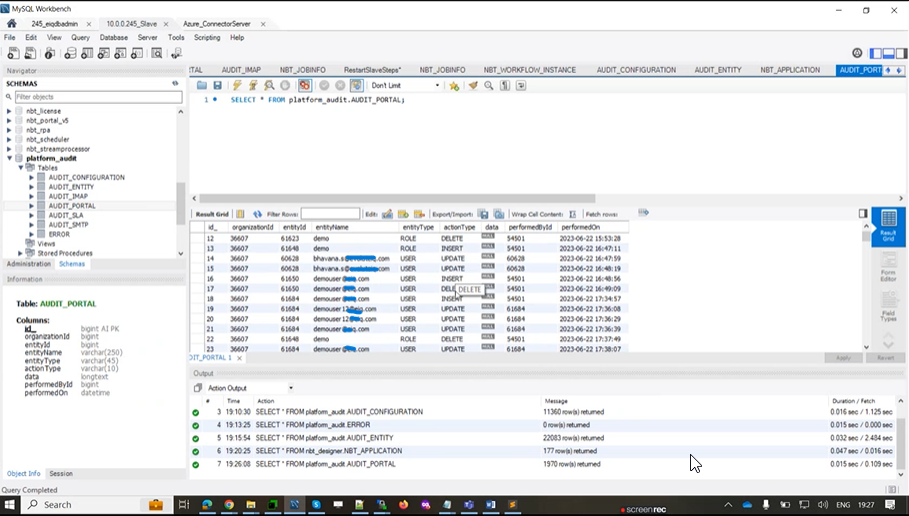
Figure 6: AUDIT PORTAL table
AUDIT_PORTAL table Details:
-
Organisation Id: Id of the Organization in which the action is done.
-
EntityId: Entity Id of the user, role or page. This is an internal reference number.
-
EntityName: Role name or the user name or the page name.
-
EntityType: For which entity - User, Role or Layout (for page), the action is performed.
-
ActionType: Type of action that is performed. INSERT, UPDATE, and DELETE are the action types.
-
PerformedById: Id of the user who performed the action.
-
PerformedOn: Date and time on which the action or operation is done.
AUDIT_PORTAL_EMAIL
When you are using the Send Email feature in the platform and an email is sent from the system during the execution, the corresponding details are captured in the AUDIT_PORTAL_EMAIL table. That is details of all the emails sent through the platform are captured. Applicable sections: Send Email in Process flow activities, Email sent during Login with OTP verification.
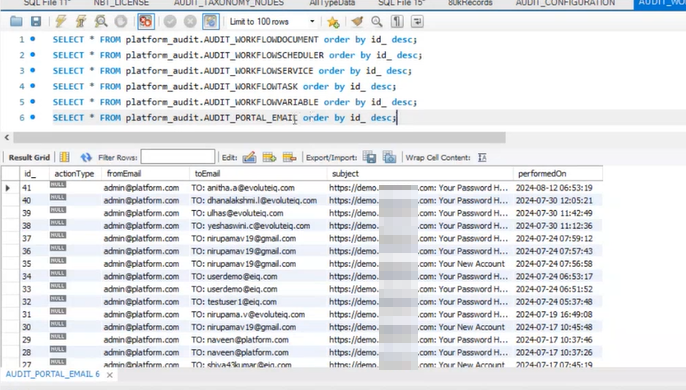
Figure 7: AUDIT_PORTAL_EMAIL Table
AUDIT_PORTAL_EMAIL table details.
- ActionType: Type of action that is performed.
- fromEmail: The email id from which email is sent.
- ToEmail: The email id to which email is sent.
- Subject: Subject line of the email.
- PerformedOn: Date and time on which the email is sent.
AUDIT_RULE
AUDIT_RULE table captures the details of rule executions and decision table executions during the runtime.
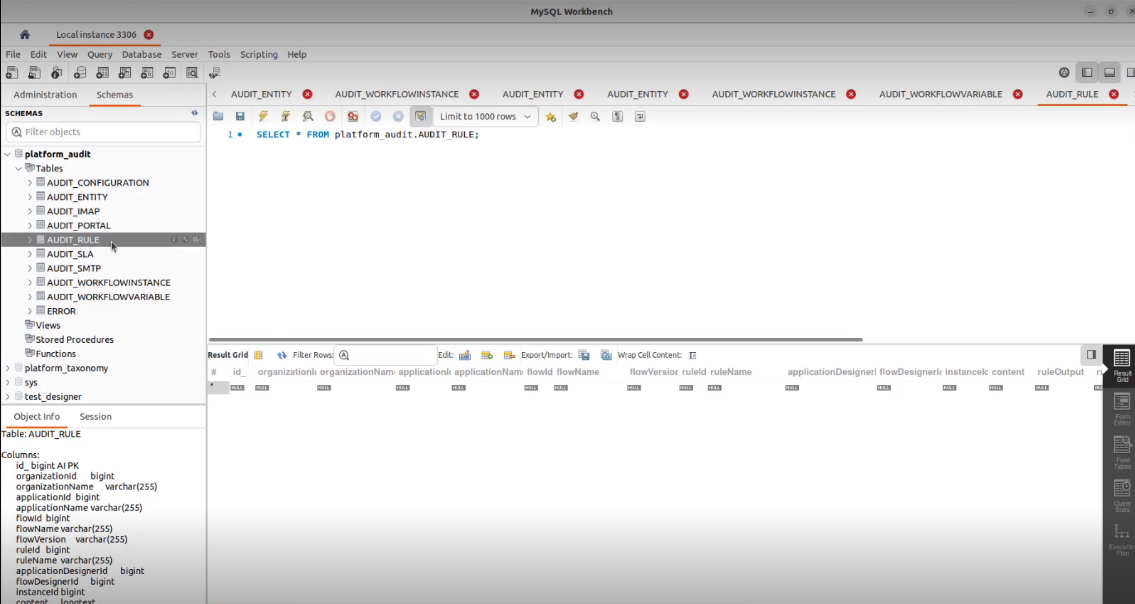
Figure 8: AUDIT RULE table details
AUDIT_RULE Table Details:
-
OrganizationId: Id of the organization.
-
OrganizationName: Name of the organization.
-
ApplicationId: Id of the associated application.
-
ApplicationName: Name of the associated application.
-
FlowId: Id of the associated process flow.
-
FlowName: Name of the associated process flow.
-
FlowVersion: Version of the process flow.
-
RuleId: Id of the rule or decision table instance.
-
RuleName: Name of the rule or the decision table.
-
ApplicationDesignerId: Id of the user who designed the application.
-
FlowDesignerId: Id of the user who designed the flow.
-
InstanceId: Id of the Organization in which the action is done.
-
Content: Conent of the rule.
-
RuleOutput: Output value of the rule.
-
RuleVariable: Variable in the rule.
-
auditType: The action performed. RULE and DECISION_TABLE are the two action typesl
-
TransitionToTake: The transition or the like that the rule takes after execution of the rule.
-
PerformedBy Id: Id of the user who performed the action.
-
PerformedByName: Name of the user who performed the action.
-
PerformedOn: Date and time on which the action or operation is done.
AUDIT SLA
AUDIT_SLA table captures details at the execution level.
The AUDIT_SLA table records the actions that are happening during the execution of the SLAs in the flow.
Applicable sections: The process flow activities – Start, Task, and Approve-Reject are associated with SLAs.
During the process flow execution, when an SLA is executed, the actions that happened in the SLA at the runtime are captured in the AUDIT SLA table.
For the Task or Approve-Reject SLA, SLA actions can be sending a email, reassign, or autocomplete.
For the Start activity, process SLA action can be sending a email.
For an SLA, the action is always performed by the system.
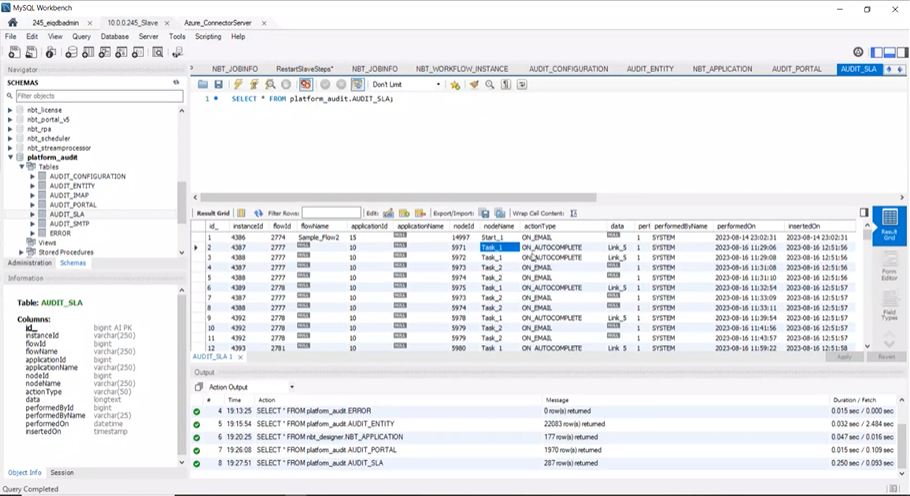
Figure 9: AUDIT SLA table
AUDIT_SLA Table Details:
-
InstanceId: Id of the Organization in which the action is done.
-
FlowId: Id of the associated process flow.
-
FlowName: Name of the associated process flow.
-
ApplicationId: Id of the associated application.
-
ApplicationName: Name of the associated application.
-
NodeId: The Id of the node or activity for which the SLA executed.
-
NodeName: Name of the node or activity for which the SLA executed.
-
ActionType: Type of action that is performed. ON_EMAIL, ON_AUTOCOMPLETE. ON_REASSIGN are the action types.
When ever the task is autocompleted by the system, the status flagged as “Expired”.
-
Data: The transition (link) that is been taken after the execution.
-
PerformedByName: Name of the user who performed the action. For SLAs, the PerformedByName will be “System”.
-
PerformedOn: Date and time on which the action or operation is done.
AUDIT_SMTP
AUDIT_SMTP table captures details at the execution level.
The AUDIT_SMTP table records details of the emails that are been sent via SMTP.
Applicable sections: Management > Configuration Management > SMTP.
During the process flow execution, when an email is triggered – that is when an email is sent from the email template or when an email is sent during the Task or Approve-reject SLA or when a meeting request email is send – the emails are sent via SMTP and the details are captured.
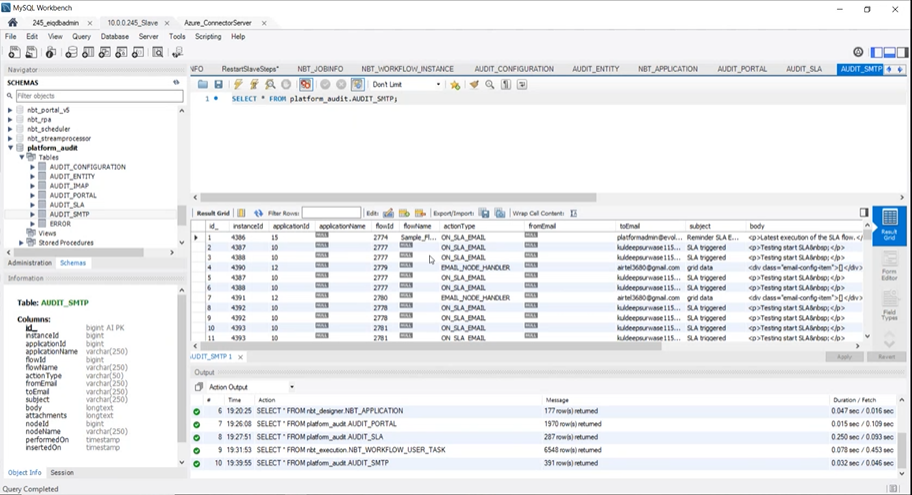
Figure 10: AUDIT SMTP table
AUDIT_SMTP Table Details:
-
InstanceId: Id of the Organization in which the action is done.
-
ApplicationId: Id of the associated application.
-
ApplicationName: Name of the associated application.
-
FlowId: Id of the associated process flow.
-
FlowName: Name of the associated process flow.
-
ActionType: Type of action that is performed. ON_SLA_EMAIL, EMAIL_NODE_HANDLER. NODE_EVENT etc., are the action types.
-
FromEmail: From address of the email. That is from which email id the email is sent.
-
ToEmail: To address in the email.
-
Subject: Subject line of the email.
-
Body: Body of the email in raw HTML format.
AUDIT_TAXONOMY_ENTITY
The AUDIT_TAXONOMY_ENTITY table captures the details of taxonomy created, updated, or deleted.
Applicable sections: Management > Taxonomy Management > Taxonomy.
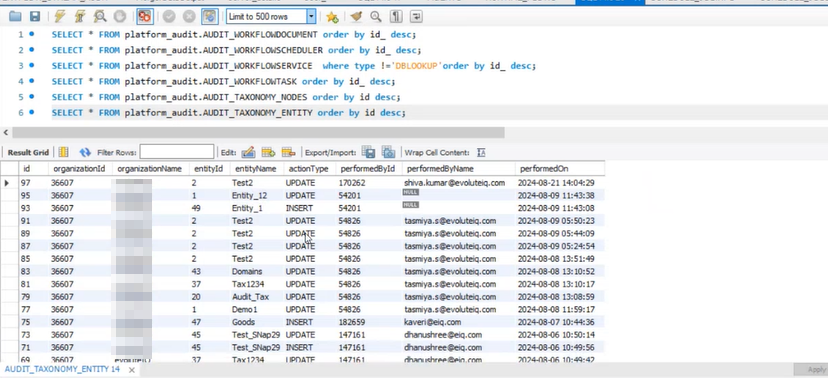
Figure 11: AUDIT_TAXONOMY_ENTITY table
AUDIT_TAXONOMY_ENTITY Table Details:
-
OrganizationId: Id of the organization.
-
OrganizationName: Name of the organization.
-
EntityId: Backend Id of the taxonomy entity
-
EntityName: Name of the taxonomy entity.
-
ActionType: Type of action that is performed for the node. INSERT, UPDATE, and DELETE are the action types.
-
PerformedById: Id of the user who performed the action.
-
PerformedByName: Name of the user who performed the action.
-
PerformedOn: Date and time on which the action or operation is done.
AUDIT_TAXONOMYNODES
The AUDIT_TAXONOMY_NODES table captures the details of a taxonomy node when you create, update, or delete a node in a taxonomy. It captures the node level details.
Applicable sections: Management > Taxonomy Management > Taxonomy.
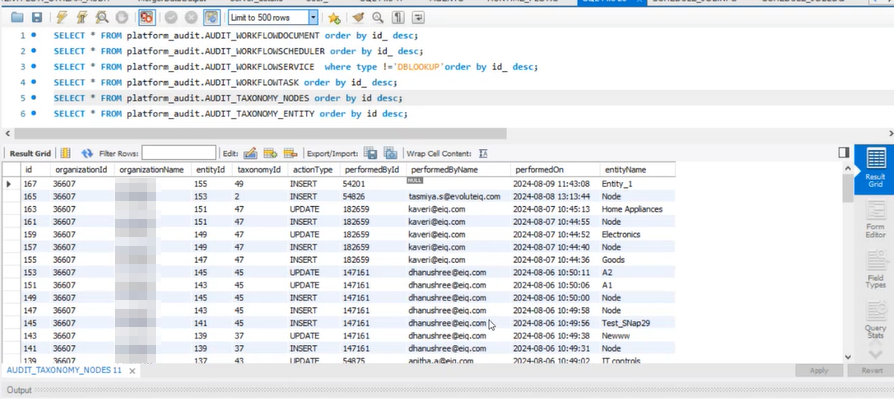
Figure 12: AUDIT_TAXONOMY_NODES table
AUDIT_TAXONOMYNODES Table Details:
-
OrganizationId: Id of the organization.
-
OrganizationName: Name of the organization.
-
EntityId: Backend Id of the node entity.
-
TaxonomyId: The backend Id of the taxonomy entity.
-
ActionType: Type of action that is performed. INSERT, UPDATE, and DELETE are the action types.
-
PerformedById: Id of the user who performed the action.
-
PerformedByName: Name of the user who performed the action.
-
PerformedOn: Date and time on which the action or operation is done.
-
EntityName: Node name.
AUDIT_WORKFLOWDOCUMENT
AUDIT_WORKFLOWDOCUMENT table audits the details of the file upload/download operation in the platform.
It captures the details of Document upload/download at runtime. Note that the uploads done at the design time are not audited.
Applicable sections: File Upload Component in the forms. Downloads using services (E.g., file download from the DMS using API – type=REST DOWNLOAD), Export feature in Summary Form control (type=REST DOWNLOAD).
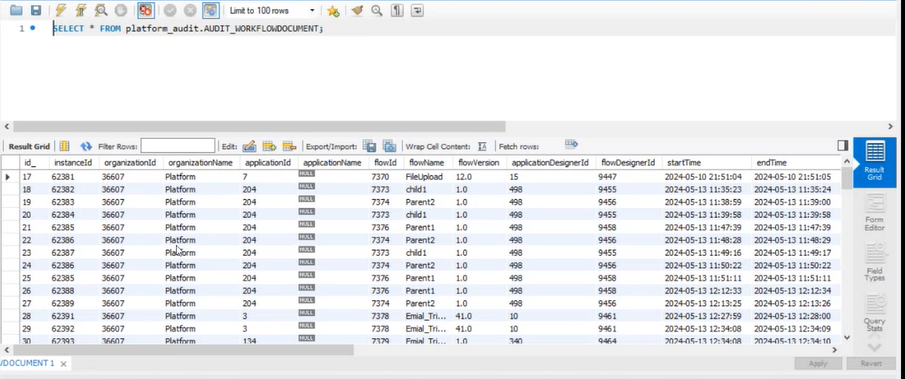
Figure 13: AUDIT_WORKFLOWDOCUMENT table
AUDIT_WORKFLOWDOCUMENT Table Details:
-
InstanceId: Instance Id of the Organisation in which the action is done.
-
OrganizationId: Id of the organization.
-
OrganizationName: Name of the organization.
-
ApplicationId: Id of the associated application.
-
ApplicationName: Name of the associated application.
-
FlowId: Id of the associated process flow.
-
FlowName: Name of the associated flow.
-
FlowVersion: Version of the flow that is executed.
-
ApplicationDesignerId: Id of the user who designed the application.
-
FlowDesignerId: Id of the user who designed the flow.
-
StartTime: Start Date and time of operation.
-
EndTime: End Date and time of operation.
-
Type: The type of operation: Upload or download. When type=REST DOWNLOAD, the table will not capture the application/flow details as the operation is performed as a service and not at the application level.
-
Path: The path where the upload or the download happened. If the upload/download happens through any file control, then the DMS path is captured. If the upload/download happens through the REST service, the local path of the file is captured.
-
Name: Name of the uploaded or downloaded document.
-
PerformedById: Id of the user who performed the action.
-
PerformedByName: Name of the user who performed the action.
-
InsertedOn: Date and time on which the action or operation is done.
-
dmsName: The name of the DMS configuration name (Management > Configuration Management > DMS – DMS configuration name that is mapped to the flow) in which the upload or download happened in case of file control upload/download. If it is REST upload/download, dmsName will be NULL.
AUDIT_WORKFLOWINSTANCE
The status of the instance and the application to flow level details of the insatance are captured in the AUDIT_WORKFLOWNTANCE table.
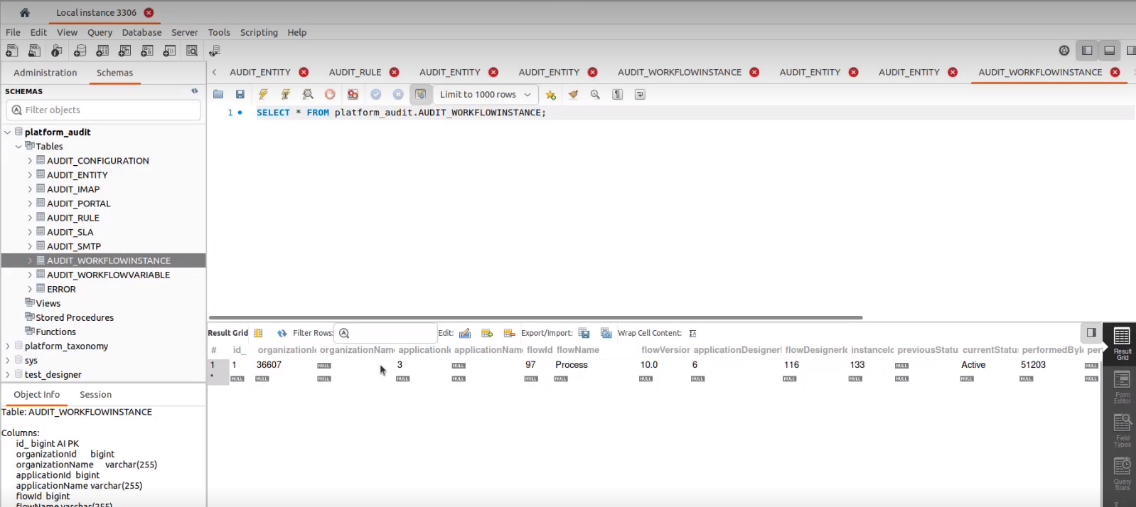
Figure 14: AUDIT_WORKFLOWINSTANCE Table
AUDIT_WORKFLOWINSTANCE Table Details:
-
OrganizationId: Id of the organization.
-
OrganizationName: Name of the organization.
-
ApplicationId: Id of the associated application.
-
ApplicationName: Name of the associated application.
-
FlowId: Id of the associated process flow.
-
FlowName: Name of the associated process flow.
-
FlowVersion: Version of the flow that is executed.
-
ApplicationDesignerId: Id of the user who designed the application.
-
FlowDesignerId: Id of the user who designed the flow.
-
InstanceId: Id of the Organisation in which the action is done.
-
PreviousStatus: The just previous status of the instance before the current status.
-
CurrentStatus: The current status that the instance. > Active and Completed are the two status available.
-
PerformedById: Id of the user who performed the action.
-
PerformedByName: Name of the user who performed the action.
-
PerformedOn: Date and time on which the action or operation is done.
AUDIT_WORKFLOWSCHEDULER
The AUDIT_WORKFLOWSCHEDULER table captures the details of the schedulers executed in the platform. For each scheduler trigger (same scheduler multiple triggers or different schedulers) the table captures the details.
Applicable sections: Management > Configuration Management > Scheduler – trigger process flow, Process flow - Email trigger, SLA.
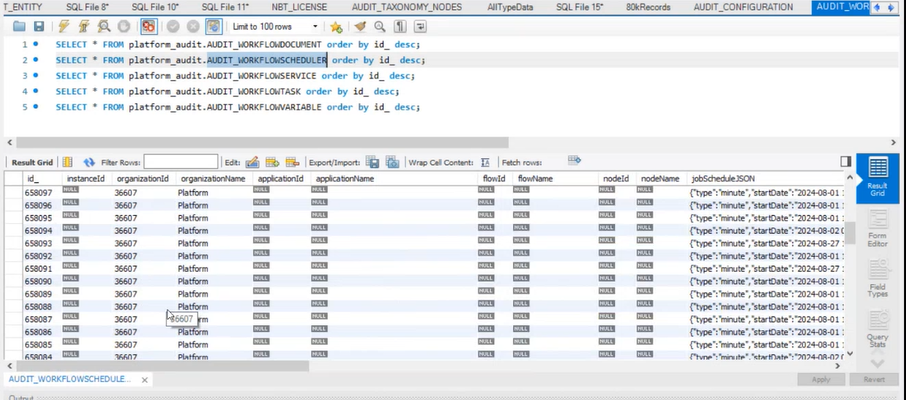
Figure 15: AUDIT_WORKFLOWSCHEDULER table
AUDIT_WORKFLOWSCHEDULER Table Details:
-
InstanceId: Instance Id of the Organisation in which the action is done.
-
OrganizationId: Id of the organization.
-
OrganizationName: Name of the organization.
-
ApplicationId: Id of the associated application.
-
ApplicationName: Name of the associated application.
-
FlowId: Id of the associated process flow.
-
FlowName: Name of the associated process flow.
-
FlowVersion: Version of the flow that is executed.
-
ApplicationDesignerId: Id of the user who designed the application.
-
FlowDesignerId: Id of the user who designed the flow.
-
NodeId: Node Id from which the scheduler is triggered if it is from a process flow.
-
NodeName: Node name associated with the node id.
-
JobScheduleJSON: JSON content of the job schedule.
-
pickedBy: The user id of the user who picked the task.
-
InExecutionTime: Date and time of the scheduler execution.
-
Status: Status of the scheduler execution.
-
isActive: Is the scheduler currently active or not.
-
isExpired: Whether the scheduler is expired or not.
-
PerformedById: Id of the user who performed the action.
-
PerformedByName: Name of the user who performed the action. This is always “SYSTEM” in this table.
-
PerformedOn: Date and time on which the action or operation is done.
-
StartTime: Start Date and time of operation.
-
EndTime: End Date and time of operation.
-
InsertedOn: The date and time on which the row entry is inserted into this audit table.
-
ErrorInfo: If there is any error in the execution of the scheduler, that error info is captured in this column.
-
ActionType: Action type of the scheduler like COMPLETED, SCHEDULE, or RESCHEDULE based on the scheduler execution.
-
JobHandler: Details of the handler class that is called. Specific actions have specific action handlers.
-
Name: Name of the job scheduler that is created in the backend table when your scheduler is executed. This name is automatically created based on your scheduler association with the application, process, email, SLA, etc. (E.g., SLA_email_Task2).
-
GroupName: The group name of the scheduler.
AUDIT_WORKFLOWSCHEDULER related tables:
Some of the details for the AUDIT_WORKFLOWSCHEDULER table are captured from the following tables;
SCHEDULE_JOBINFO: Creates a new job with details when a scheduler executes.
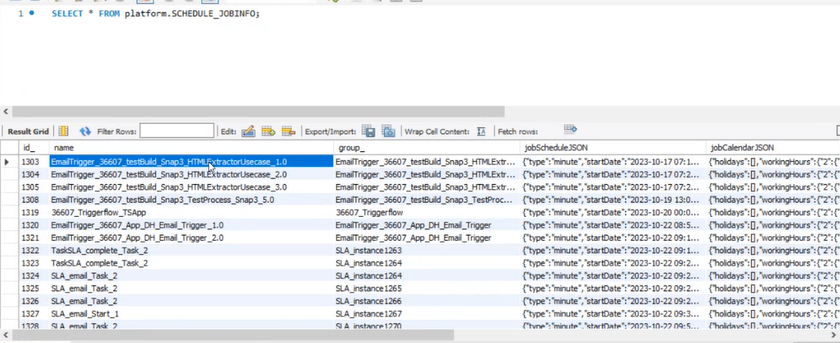
Figure 16: AUDIT_SCHEDULE_JOBINFO table table
SCHEDULE_JOBLOG: For each line item in the SCHEDULE_JOBINFO table (that is for each job), the SCHEDULE_JOBLOG table creates the job log. For the first scheduler trigger, one job is created in the SCHEDULE_JOBINFO. Now for each trigger of the same scheduler, details are updated in the SCHEDULE_JOBLOG.
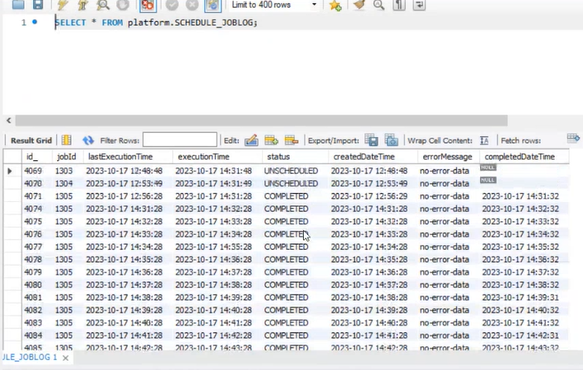
Figure 17: AUDIT_SCHEDULE_JOBLOG table
AUDIT_WORKFLOWSERVICE
AUDIT_WORKFLOWSERVICE table captures details of the execution of the DBScript in the application. It executes all the input statements or procedure or lookup in the DBscript.
Applicable sections: AppStudio > Applications > Processflow – DBScripts section; AppStudio > Applications > Processflow - Webservice executions, DMN executions (BRMS rule).
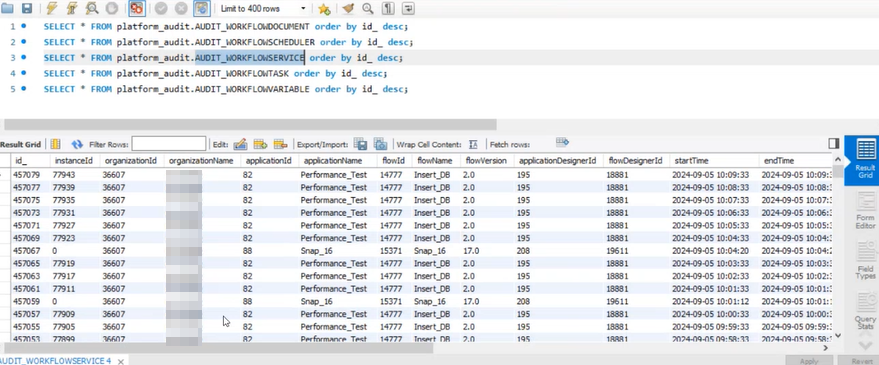
Figure 18: AUDIT_WORKFLOWSERVICE table
AUDIT_WORKFLOWSERVICE Table details:
-
InstanceId: Instance Id of the Organisation in which the action is done.
-
OrganizationId: Id of the organization.
-
OrganizationName: Name of the organization.
-
ApplicationId: Id of the associated application.
-
ApplicationName: Name of the associated application.
-
FlowId: Id of the associated process flow.
-
FlowName: Name of the associated process flow.
-
FlowVersion: Version of the flow that is executed.
-
ApplicationDesignerId: Id of the user who designed the application.
-
FlowDesignerId: Id of the user who designed the flow.
-
StartTime: Start Date and time of operation.
-
EndTime: End Date and time of operation.
-
Type: Type of the service executed. For example, DBLOOKUP, WEBSERVICE, BRMS RULE.
-
Resource: The server name in which the service runs.
-
Input: Input queries or statements that are passed as input.
-
Output: Output is the metadata of the output and not the actual output. Only the column details of the output are captured in this column
-
PerformedById: Id of the user who performed the action.
-
PerformedByName: Name of the user who performed the action. This is always “SYSTEM” in this table.
-
PerformedOn: Date and time on which the action or operation is done.
-
InsertedOn: The date and time on which the row entry is inserted into this audit table.
-
ErrorInfo: If there is any error in the execution of the scheduler, that error info is captured in this column.
AUDIT_WORKFLOWTASK
AUDIT_WORKFLOWTASK table captures all the details of the execution of activities (front-end and back-end) in the flow.
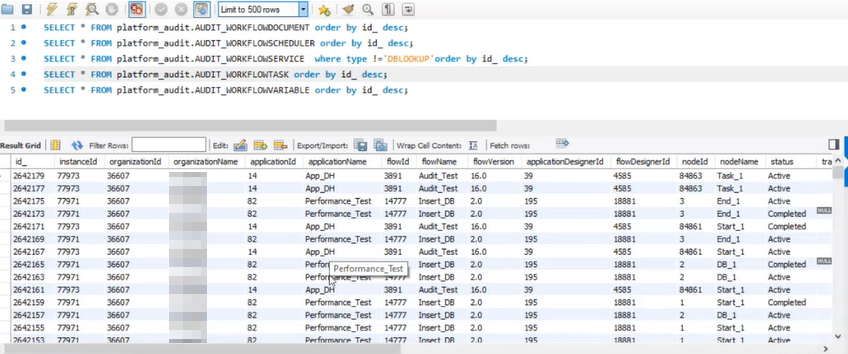
Figure 19: AUDIT_WORKFLOWTASK table
AUDIT_WORKFLOWTASK Table details:
-
InstanceId: Instance Id of the Organisation in which the action is done.
-
OrganizationId: Id of the organization.
-
OrganizationName: Name of the organization.
-
ApplicationId: Id of the associated application.
-
ApplicationName: Name of the associated application.
-
FlowId: Id of the associated process flow.
-
FlowName: Name of the associated process flow.
-
FlowVersion: Version of the flow that is executed.
-
ApplicationDesignerId: Id of the user who designed the application.
-
FlowDesignerId: Id of the user who designed the flow.
-
NodeId: Node Id.
-
NodeName: Activity name associated with the node id.
-
Status: Status of the execution. For example, Active, Completed, Error. For Approve-Reject node there is an additional status “Expired” which happens when a user does not act on that activity until the timer ends. This indicates that the activity was auto-completed by the system.
-
TransitionToTake: The transition name or the link name that the node or activity takes.
-
IsPool: Is the activity assigned to multiple users (1) or not (0).
-
PickedBy: The Id of the user who picked the task if IsPool=1.
-
IsDeligated: Is the activity delegated to multiple users (1) or not (0).
-
IsAutocomplete: Is the activity autocompleted (1) or not (0).
-
IsExecuteSync: Is the activity executed synchronously (1) or not (0).
-
ActionType: The current action of the activity: NODE_ENTER, NODE_EXECUTE, and NODE_LEAVE are the action types for the activity.
-
PerformedById: Id of the user who performed the action.
-
PerformedByName: Name of the user who performed the action. This is always “SYSTEM” in this table.
-
PerformedOn: Date and time on which the action or operation is done.
-
InsertedOn: The date and time on which the row entry is inserted into this audit table.
-
AuditType: Indicates if the activity is executed by the user or the system.
-
ErrorInfo: If there is any error in the execution, that error info is captured in this column.
AUDIT_WORKFLOWVARIABLE
Variable level updates in the runtime for each instance are captured in the AUDIT_WORKFLOWVARIABLE table.
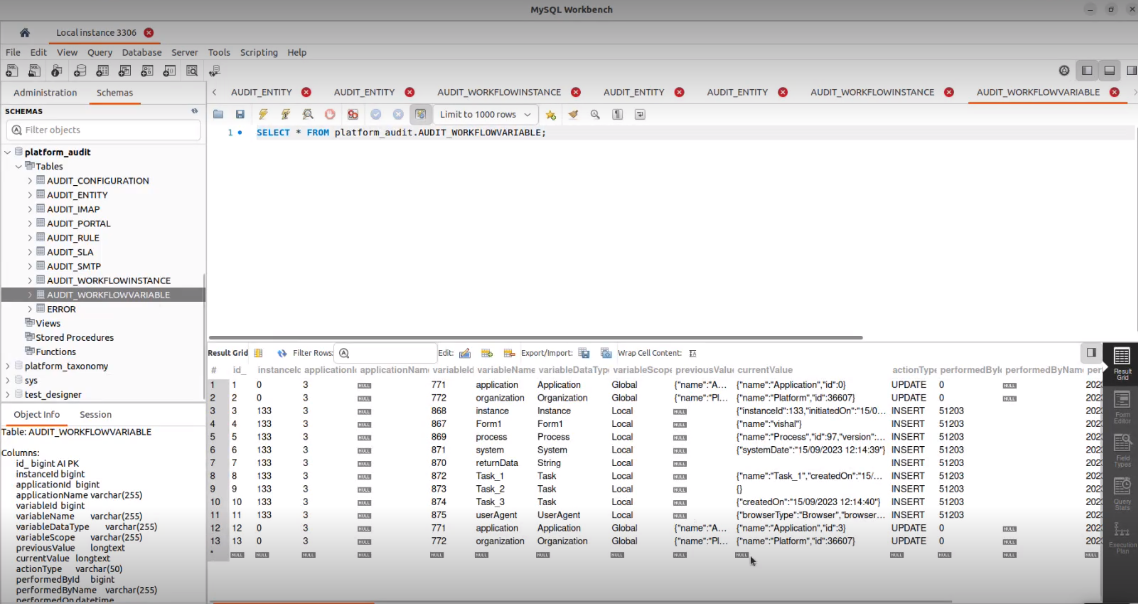
Figure 20: AUDIT_WORKLOWVARIABLE table
-
InstanceId: Instance id of the flow.
-
ApplicationId: Id of the associated application.
-
ApplicationName: Name of the associated application.
-
VariableId: Id of the variable intance.
-
VariableName: Name of the variable.
-
VariableDataType: Datatype of the variable.
-
PreviousValue: The just previous value that the variable has accepted before the current value.
-
CurrentValue: The value that the variable has currently accepted.
-
ActionType: The action performed on the variable (UPDATE, INSERT, DELETE).
-
PerformedById: Id of the user who performed the action.
-
PerformedByName: Name of the user who performed the action.
-
PerformedOn: Date and time on which the action or operation is done.
Utilization of Audit Tables
Using Audit Tables in Process Flows
Audit tables are usually accessed using any DB tools. However, you can utilize the process flows to capture the audit table details as per your requirements. To create a process flow for capturing the audit table details, you need to perform the following actions.
-
Create and configure a Database Script entity for the process flow. Using queries you can fetch the details from the tables. Create the Database Script entity as a lookup.
-
Design a Form entity with the required UI elements and configure the lookup for fetching the details.
-
Design a process flow using the task activity and then configure the form to that task activity.
-
Execute the Process flow.
Use Cases
Creating Audit Report
You can extract the details of the audit tables and create reports using the details. You can also create charts using the audit report tables.
Auto-Trigger of Process Flow
On auto-complete if an SLA you can trigger another process flow. That is, during auto-complete, the status becomes “expired” and based on this status, you can trigger another flow. This can be used to extract details from the SLA table.
Configuration Update
Consider that you want to update the role of the user automatically during the creation of the user. You can use a process flow for the same and if any user creation is updated in the audit table, you can configure the flow in such a way as to update its role.